Whether you are a DJ preparing a seamless transition between two different genres, a musician slowing down an intricate guitar solo for practice, or a creator building a viral "Slowed + Reverb" aesthetic for TikTok and YouTube, knowing how to make music BPM slower with AI is one of the most practical audio skills today.
In the past, reducing the tempo of an audio file was notorious for two frustrating issues: the "chipmunk or demon effect" (where lowering speed lowered pitch) and phase artifacts (where transients become muddy and metallic). Modern generative AI and neural time-stretching have eliminated these problems. Below is our complete, step-by-step guide to slowing down music BPM while preserving pristine acoustic clarity.
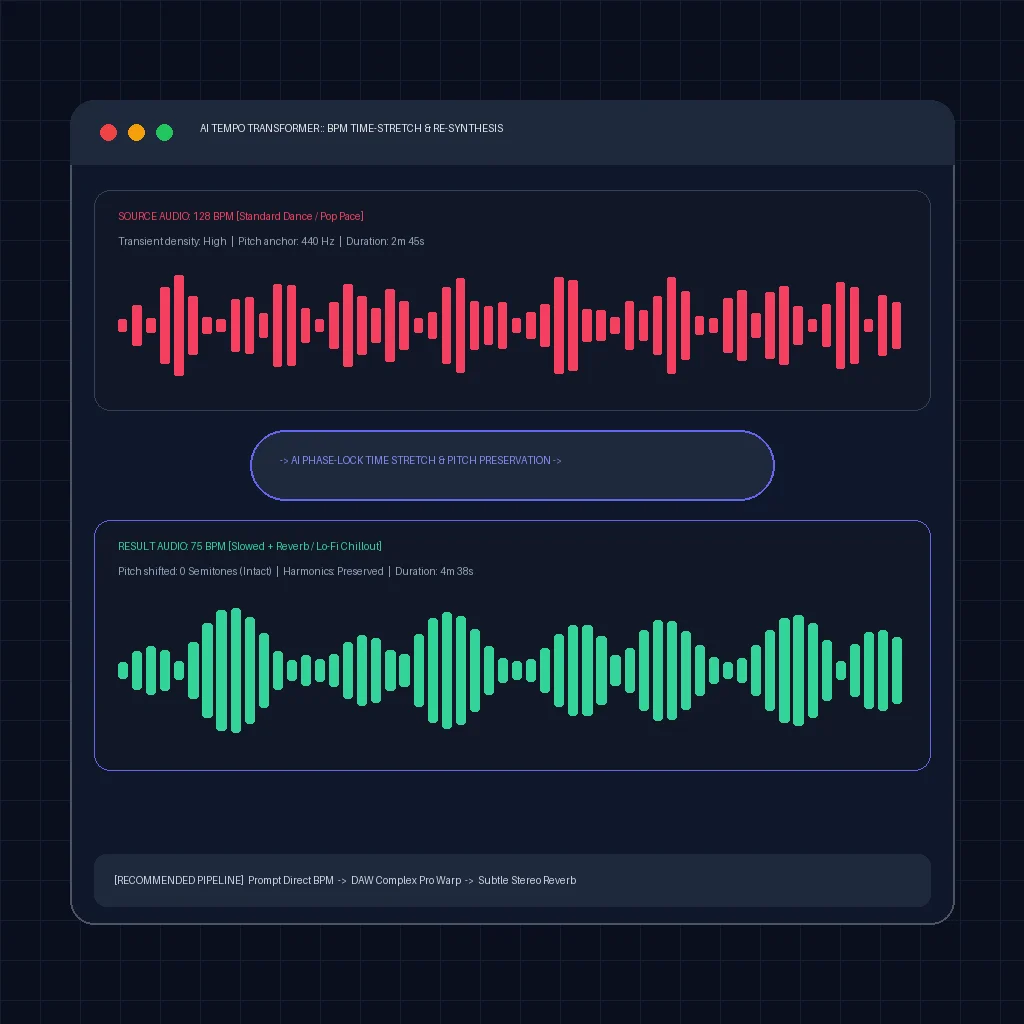
Comparing neural time-stretching and native AI prompt re-synthesis across tempo alteration workflows.
Comparison Matrix: 4 Ways to Slow Down Song BPM
| Method | Pitch Preservation | Artifact Risk | Processing Time | Stems Needed? | Best For |
|---|---|---|---|---|---|
| AI Native Prompting | 100% Perfect (Natural) | Zero Artifacts | Under 30 seconds | No | Fresh backing tracks & royalty-free stems |
| DAW Neural Warp (Ableton/Logic) | Excellent (±0 Semitones) | Low (< 25% shift) | 2-5 minutes | Optional (Better with stems) | Music producers & DJ mashups |
| AI Stem Isolation + Stretch | High (Independent processing) | Very Low | 3-8 minutes | Yes (Extracted by AI) | Preserving vocal sibilance in dense mixes |
| Online Browser Shifters | Moderate | Moderate to High | Instant | No | Quick casual practice & playback testing |
Method 1: Native AI Prompting (Zero Artifacts Guaranteed)
If you are creating new tracks for background video, streaming, or game sound design, time-stretching an existing file is technically the inferior approach. When you stretch a 130 BPM file down to 75 BPM, you force algorithms to interpolate missing audio data, which inevitably smears drum transients.
The cleanest modern solution is to prompt an AI engine like AISongGenie with explicit tempo anchors. Because the neural diffusion model generates audio directly at your desired target BPM, every kick drum, guitar strum, and vocal breath naturally falls into place without mathematical stretching artifacts.
How to Structure a Low-BPM Prompt:
- Include Exact Numerical BPM: Always state
at 70 BPMortempo 65-75 BPMrather than subjective words like "slow". - Specify Laid-Back Instrumentation: Words like "brushed acoustic drums", "dusty Rhodes piano", and "sustained analog pads" guide the model to leave harmonic breathing room between beats.
- Define the Vocal Energy: Request "hushed, intimate female vocals" or "laid-back soulful flow" to prevent high-tempo vocal delivery over slow instruments.
Try AISongGenie Free — Generate a 70 BPM Chill Lo-Fi Track
Method 2: DAW Neural Time-Stretching (Complex Pro & Flex Time)
For music producers working with existing audio files in a Digital Audio Workstation (DAW), built-in AI warp algorithms offer precise control:
- Ableton Live (Complex Pro Warp Mode): Import your audio clip and activate
Warp. Switch the warp mode from Beats to Complex Pro. Complex Pro uses an advanced spectral envelope algorithm. Set Formants to100to prevent the vocal timbre from thinning out, and lower the project tempo from e.g., 128 to 90 BPM. - Logic Pro (Flex Time - Polyphonic / Speed): Enable
Flex Timeon your audio track. Select Polyphonic for full mixes or Monophonic for isolated vocal/bass tracks. Drag the tempo slider down. Logic automatically preserves original pitch while recalculating sample positions. - FL Studio (Resample vs Stretch 2): Open the audio clip sampler settings. Change the time-stretching mode from Resample to Stretch or Stretch Pro. Turning the
Timeknob stretches duration while locking the pitch to its root key.
Method 3: AI Stem Separation First, Then Tempo Shift
A common mistake when slowing down a full stereo master is stretching drums and vocals simultaneously. Drum transients require sharp envelope preservation, whereas vocals require smooth formant tracking. Running both through the same algorithm creates phase smearing.
The professional workaround is to split the track first using stem separation tools (such as those in Udio Pro or dedicated open-source stem splitters like Demucs):
- Vocal Stem: Apply formant-preserving pitch-lock stretching (e.g., Melodyne or Soundtoys Little AlterBoy).
- Drum Stem: Apply transient-slice stretching (where the hits stay crisp and only the silence between hits elongates).
- Bass & Synths: Apply smooth granular or polyphonic stretching.
Once all stems are locked at your slower target BPM, mix them back together for a pristine result.
Method 4: Achieving the Viral "Slowed + Reverb" Sound
The "Slowed + Reverb" aesthetic is one of the most dominant audio formats on TikTok, YouTube Shorts, and lo-fi streaming channels. To craft an authentic version:
- Reduce Speed by 15% to 25%: If the original song is 120 BPM, reducing it to approximately 95–102 BPM provides the signature dreamy, nostalgic weight without turning sluggish.
- Pitch Pitch-Drop Option: Unlike professional DJ transitions, viral lo-fi tracks often allow pitch to drop by 1 to 2 semitones along with tempo. This delivers the iconic deep, relaxed vocal texture.
- Apply Low-Pass EQ Filter: Cut harsh high frequencies above 8kHz–10kHz to mimic the warm acoustic damping of vintage analog tape.
- Insert a Large Hall or Plate Reverb: Place a reverb with a 2.5s to 4.0s decay time on an auxiliary send, wet/dry blend around 25%–35%, and high-pass the reverb return above 200Hz to prevent low-end mud.
Frequently Asked Questions
Does slowing down a song's BPM automatically change the pitch?
Not with modern digital audio algorithms. In older tape decks or vinyl players, lowering speed lowered pitch. However, modern AI time-stretching engines use phase vocoders and granular synthesis to stretch the time domain independently of frequency, allowing you to slow a 140 BPM dance track down to 80 BPM while keeping the musical key exactly identical.
What is the best way to avoid metallic artifacts when slowing audio?
The most effective strategy is to avoid stretching beyond 30% of the original tempo. If you must slow a track significantly (e.g., from 130 BPM down to 70 BPM), generating a new version natively using an AI music generator like AISongGenie by setting your target tempo in the prompt yields zero artifacts because no stretching occurs.
What is the ideal BPM for chill and lo-fi music?
The golden tempo range for lo-fi hip-hop and chillout music is 70 to 85 BPM. Within this range, drum grooves have enough space for swing and syncopation, while melodic instruments like piano, Rhodes, and guitars linger smoothly without rushing the listener.
Can I slow down copyrighted songs and upload them to YouTube?
Altering the tempo and adding reverb to a copyrighted track does not create a new copyright. YouTube's Content ID system frequently detects slowed tracks, resulting in claims or monetization diversion to the original rights holder. For monetized commercial content, always use royalty-free AI-generated music or licensed stems.
Explore Related AI Audio Guides
Frequently Asked Questions
Can I commercially use songs generated with AISongGenie?
Yes. All tracks generated under paid subscriptions or eligible commercial licenses include full commercial rights. You can release your music on Spotify, Apple Music, YouTube, and monetize across podcasts, games, and video campaigns without copyright strikes.
What audio quality and export formats are supported?
AISongGenie delivers studio-mastered audio files in 320kbps MP3 and uncompressed WAV formats. Automated acoustic mastering guarantees balanced dynamic range, clear vocals, and punchy low-end frequencies across all playback systems.
How do I craft effective prompts for AI music generation?
Describe key musical dimensions in your prompt: genre, tempo or BPM, mood, instrumentation, and vocal style. You can also paste your own custom lyrics or let our built-in lyric generator craft structured verses and choruses automatically.